What Is a Web Server? How Node.js Handles Requests and Responses
1. What Is a Web Server?
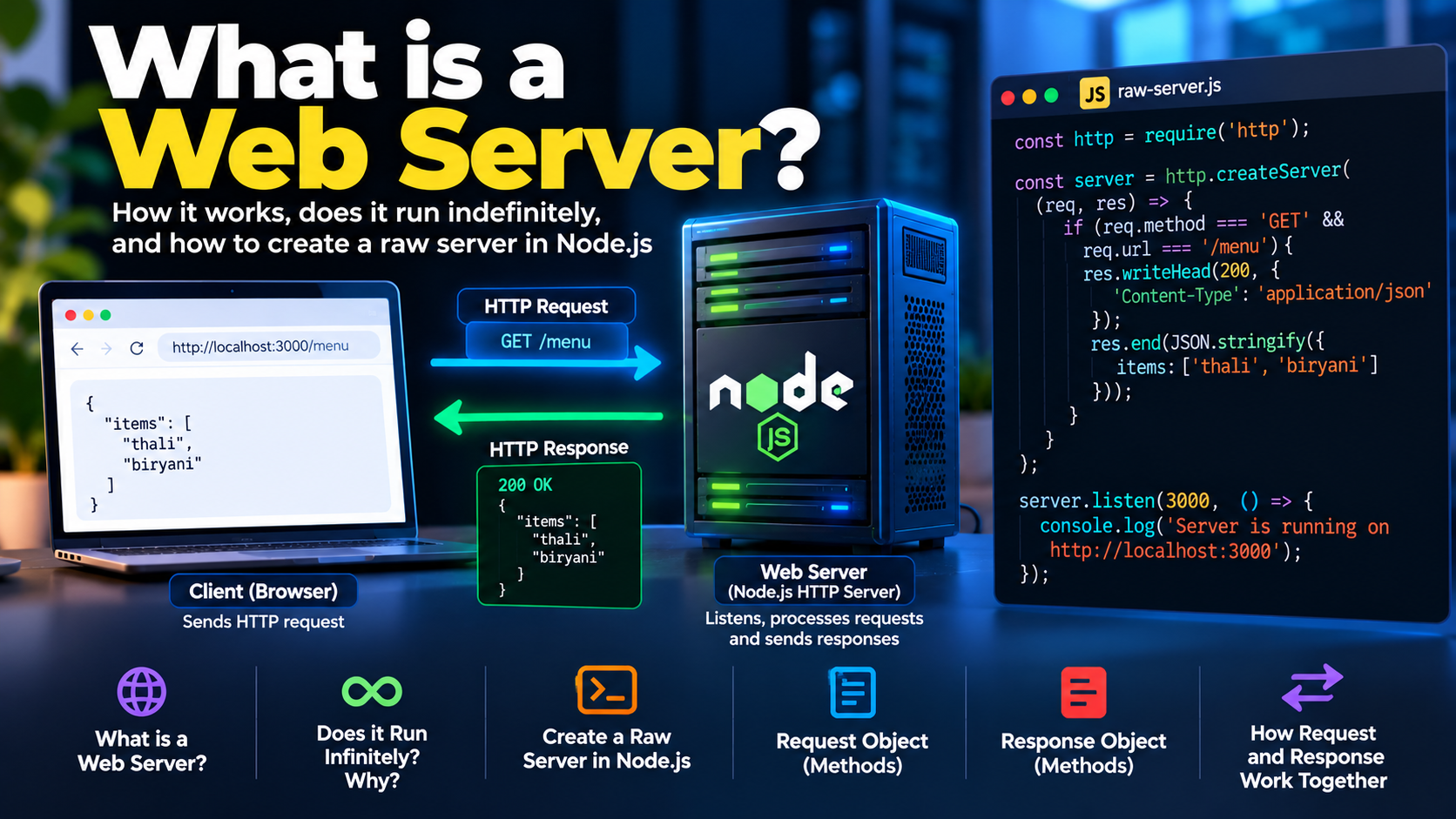
A web server is software that listens for incoming HTTP requests, processes them, and sends HTTP responses back to clients. The computer running that software is also commonly called a server.
When you open a website, your browser acts as an HTTP client. It sends a request to a server, and the server returns a response containing the requested resource or information.
For example, when you visit:
http://localhost:3000/
The browser sends an HTTP request to a server listening on port 3000 of your local machine. The server processes the request and might return a text message, HTML page, or JSON data.
A web server typically performs the following steps:
Listens for incoming connections.
Receives HTTP requests.
Determines how to handle each request.
Sends an HTTP response with an appropriate status code, headers, and optional body.
A web server does not necessarily need a database. It can return static content, process business logic, communicate with databases, or call external services.
Is Node.js a Web Server?
Node.js is a JavaScript runtime, not a web server by itself. However, it provides built-in networking modules, including node:http, that allow developers to create HTTP servers.
For example, we can create a basic web server using Node.js without installing Express or any other web framework.
2. Does a Server Run Infinitely? Why?
A server is usually designed to keep running and listening for requests until it is intentionally stopped, encounters a fatal failure, or is terminated by its environment.
Consider a server that listens on port 3000. If it handled only one request and then exited, the next client would be unable to use it.
A web server therefore needs a mechanism to keep accepting connections and processing requests over time.
In Node.js, this behavior is supported by the event loop and active event-loop resources.
When we call:
server.listen(3000, () => {
  console.log("Server is running on port 3000");
});
Node.js starts listening for connections. The listening server keeps the event loop active, so the process normally remains alive while it is listening.
This does not mean the program contains an infinite loop that continuously executes our request-handling code. Instead, Node.js waits for events and invokes the relevant callbacks when requests or other events occur.
The server can handle many requests over its lifetime without restarting after each request.
What happens when the server stops?
The server can stop when:
We explicitly close the server.
The process is terminated.
An unhandled fatal error causes the process to exit.
The hosting environment stops or restarts the application.
In production, applications are often managed by a process manager, container platform, or hosting service that can restart a process after a failure.
The key idea is that a server is a long-running application, not a program that must continuously execute a loop to stay alive.
3. How to Create a Raw HTTP Server in Node.js
Node.js provides the built-in node:http module for creating HTTP servers.
We call a server created directly with this module a raw Node.js HTTP server to distinguish it from an application built using a framework such as Express.
No additional package is required for this example.
Step 1: Create the project
Make sure Node.js is installed, then create a file named raw-node-server.js.
Step 2: Create the server
const http = require("http");

const server = http.createServer((req, res) => {
  if (req.method === "GET" && req.url === "/") {
    res.writeHead(200, {
      "Content-Type": "text/plain"
    });

    res.end("Welcome to the Node.js server!");
  } else if (req.method === "GET" && req.url === "/menu") {
    res.writeHead(200, {
      "Content-Type": "application/json"
    });

    res.end(JSON.stringify({
      items: ["thali", "biryani"]
    }));
  } else if (req.method === "POST" && req.url === "/order") {
    let data = "";

    req.on("data", (chunk) => {
      data += chunk;
    });

    req.on("end", () => {
      try {
        const order = JSON.parse(data);

        res.writeHead(200, {
          "Content-Type": "application/json"
        });

        res.end(JSON.stringify({
          status: "received",
          order
        }));
      } catch {
        res.writeHead(400, {
          "Content-Type": "application/json"
        });

        res.end(JSON.stringify({
          error: "Invalid JSON"
        }));
      }
    });
  } else {
    res.writeHead(404, {
      "Content-Type": "text/plain"
    });

    res.end("404 Not Found");
  }
});

server.listen(3000, () => {
  console.log("Server is running on http://localhost:3000");
});
This example follows the same approach as the supplied raw-server code, with basic handling for invalid JSON added.
Step 3: Run the server
node raw-node-server.js
The terminal displays:
Server is running on http://localhost:3000
The server now listens for requests on port 3000.
You can test the routes using a browser or an HTTP client such as curl or Postman.
Understanding http.createServer()
const server = http.createServer((req, res) => {
  // Handle the request
});
The createServer() method creates an HTTP server and registers a request listener.
Whenever an HTTP request is received, Node.js invokes the listener with two important objects:
req: Represents the incoming request.res: Represents the outgoing response.
The request handler determines what the server should do and how it should respond.
4. Understanding Request and Response Objects
The request and response objects are central to HTTP server development.
The Request Object (req)
The request object contains information about the incoming HTTP request, including the method, URL, headers, and body.
Common properties and methods include:
| Property or method | Purpose |
|---|---|
req.method |
Identifies the HTTP method, such as GET or POST. |
req.url |
Contains the request URL path and query string. |
req.headers |
Contains the request headers. |
req.on("data", callback) |
Receives chunks of the request body. |
req.on("end", callback) |
Signals that the request body has been fully received. |
For example:
const server = http.createServer((req, res) => {
  console.log(req.method);
  console.log(req.url);
  console.log(req.headers);

  res.end("Request received");
});
If a client sends a GET request to /menu, the server can inspect req.method and req.url to decide how to process it.
For request bodies, the raw Node.js API exposes a stream. The server may receive the body in multiple chunks, which is why the data and end events are useful.
The body should be parsed and validated before the application trusts its contents.
The Response Object (res)
The response object allows the server to send an HTTP response to the client.
Common methods include:
| Method | Purpose |
|---|---|
res.writeHead(statusCode, headers) |
Sets the status code and response headers. |
res.setHeader(name, value) |
Sets an individual response header. |
res.write(data) |
Writes a chunk of the response body. |
res.end(data) |
Ends the response and can send a final body chunk. |
For example:
res.writeHead(200, {
  "Content-Type": "application/json"
});

res.end(JSON.stringify({
  message: "Request successful"
}));
This sends a successful HTTP response with a JSON body.
The Content-Type header tells the client how to interpret the response body. In this example, the body is JSON.
A response should normally be completed exactly once. Once the response has ended, the server cannot send another independent response for the same request.
5. How the Request and Response Work Together
Consider a client requesting the menu:
GET /menu HTTP/1.1
Host: localhost:3000
The server checks the method and URL, then returns a response similar to:
HTTP/1.1 200 OK
Content-Type: application/json
{
  "items": ["thali", "biryani"]
}
The client sends the request, the server processes it, and the response communicates the result.
For a POST /order request, the client can send a JSON body containing an order. The server reads the body, parses the JSON, processes the order, and returns a response.
The important distinction is that HTTP defines the communication protocol, while Node.js provides the APIs used to implement the server.
6. Raw Node.js Server vs Express
A raw Node.js HTTP server gives us direct control over request handling, but we must implement much of the routing and request processing ourselves.
Express is a web framework built on Node.js that simplifies common tasks such as routing, middleware, request parsing, and response handling.
| Feature | Raw Node.js HTTP | Express |
|---|---|---|
| HTTP server | Built using node:http |
Uses Node.js HTTP infrastructure |
| Routing | Implemented manually | Provides route methods |
| Middleware | Must be implemented manually | Built-in middleware pattern |
| JSON request parsing | Must be handled manually or with additional utilities | express.json() middleware |
| Response handling | Uses Node.js response methods | Provides methods such as res.status() and res.json() |
| Flexibility | Direct, low-level control | Higher-level abstractions |
Express does not replace Node.js. It builds on Node.js and makes common web-server tasks easier to organize.
Conclusion
A web server listens for HTTP requests, processes them, and sends responses. Node.js allows us to create such servers directly with the built-in HTTP module.
Understanding the request and response objects is the foundation for backend development. Once we understand how raw HTTP handling works, frameworks such as Express become easier to understand because we can see which problems they simplify.
Comments
Join the discussionNo comments yet. Be the first to comment.